

- Secret API Keys: For server-to-server communication (i.e., REST APIs).
- Client API Keys: For client-side communication (i.e., JSON-RPC).
Prerequisites
It is assumed you are logged into an existing CDP account (if not, create one).1. Create an API key
Your CDP account should include a project by default. Navigate to your API keys dashboard. From the top drop-down, select your desired project.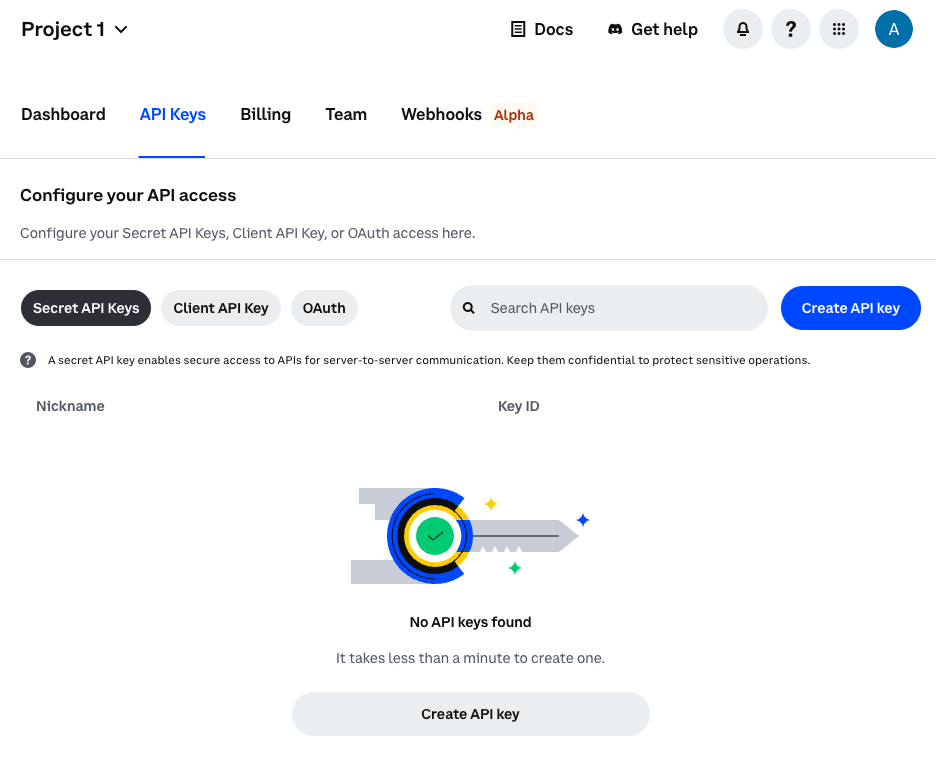 Continue reading based on the type of API key you need to create.
Server
To create a Secret API key (for server-to-server communication), ensure the Secret API Keys tab is selected as shown in the previous step. Click the Create API key button and give your key a name. You also have the option to:- Set an IP allowlist for the key
- Restrict granular permissions such as the ability to trade or transfer funds
- Select between Ed25519 (Recommended) or ECDSA signature algorithms
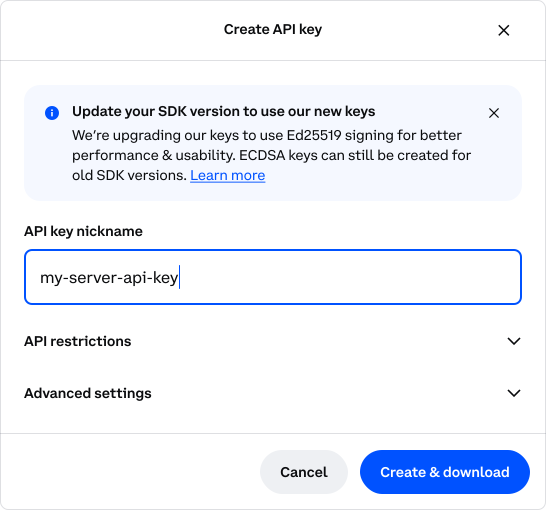 A modal will appear with your key details.
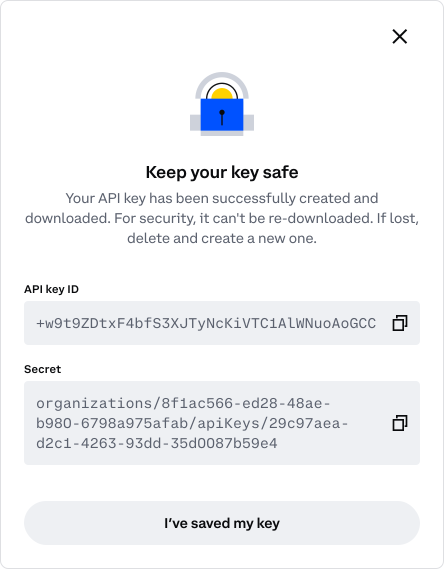 Make sure you save the API key ID and Secret in a safe place. You can’t re-download it later.
To regenerate a Secret API key, click Configure to delete and recreate the key.
Client
To create a Client API key (for use in front-end components) ensure the Client API Key tab is selected.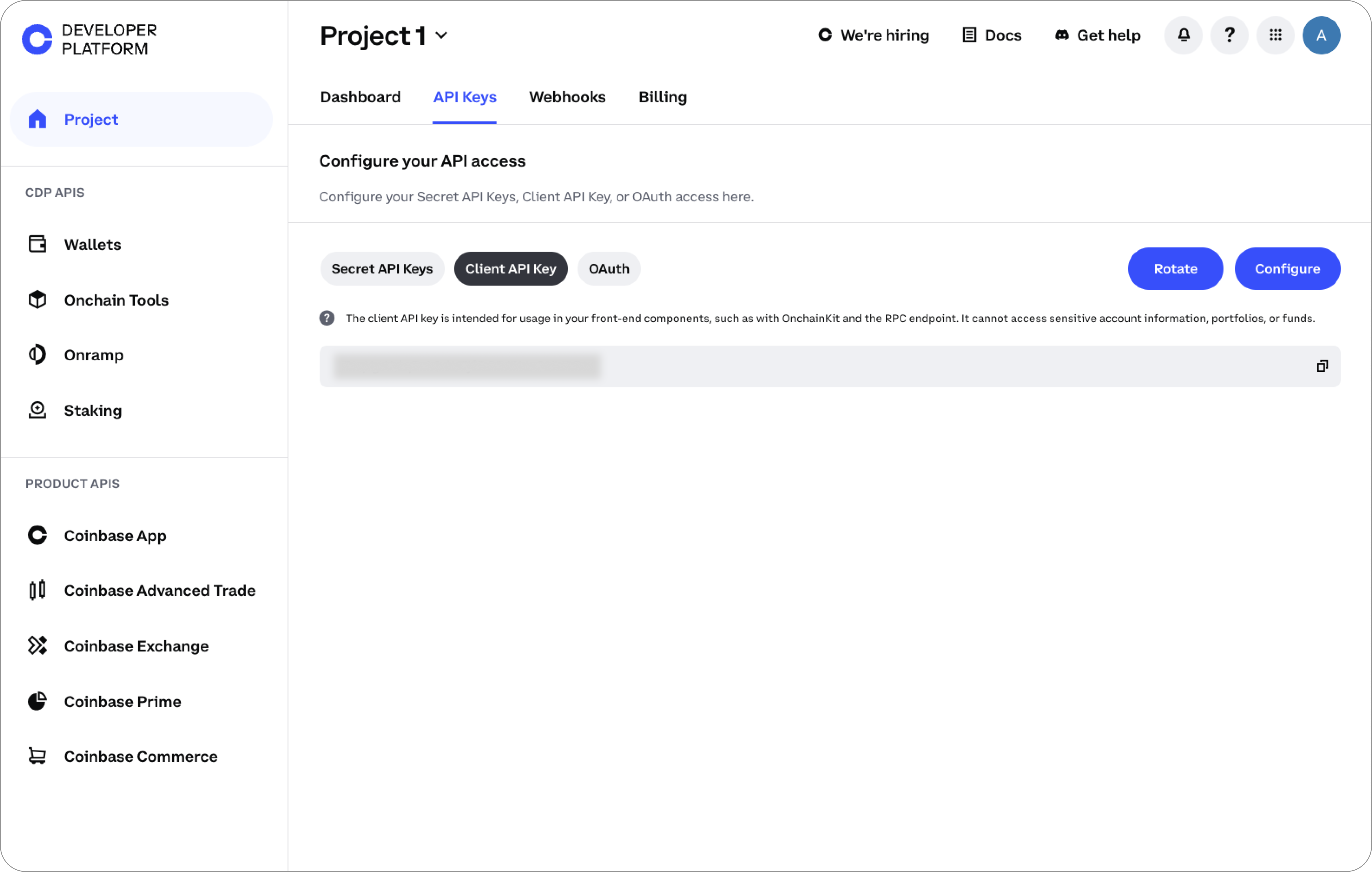 Copy the Client API key and export it as an environment variable:
Copy
Ask AI
export CLIENT_API_KEY="your_client_api_key"
Click the Rotate button to expire this key and generate a new one.
2. Generate JWT (Server only)
You can generate a JSON Web Token (JWT) using the following code snippets.More on JWTs
More on JWTs
A JWT is a compact, self-contained, stateless token format used to securely transmit API keys as a JSON object for authentication with the CDP API.Read more in our JWT documentation.
- Set up your environment for JWT generation by configuring environment variables and installing dependencies
- Export your generated JWT as an environment variable
Never include Secret API key information in your code.Instead, securely store it and retrieve it from an environment variable, a secure database, or other storage mechanism intended for highly-sensitive parameters.
Setup
To begin, export the following environment variables:KEY_NAME: The name of the API key you want to useKEY_SECRET: The secret of the API key you want to useREQUEST_METHOD: The HTTP method of the endpoint you want to targetREQUEST_PATH: The path of the endpoint you want to targetREQUEST_HOST: The host of the endpoint you want to target
Copy
Ask AI
export KEY_NAME="organizations/{org_id}/apiKeys/{key_id}"
export KEY_SECRET="-----BEGIN EC PRIVATE KEY-----\nYOUR PRIVATE KEY\n-----END EC PRIVATE KEY-----\n"
export REQUEST_METHOD="GET"
export REQUEST_PATH="/api/v3/brokerage/accounts"
export REQUEST_HOST="api.coinbase.com"
Newlines must be preserved to properly parse the key secret. Do this on one line by using \n to escape new lines, or via a multi-line string.
- Python
- JavaScript
- TypeScript
- Go
- Ruby
- PHP
- Java
- C++
- C#
Install required dependencies:
Copy
Ask AI
pip install PyJWT==2.8.0
pip install cryptography==42.0.5
Install required dependencies:
Copy
Ask AI
npm install jsonwebtoken
Install required dependencies:
Copy
Ask AI
npm install jsonwebtoken
npm install @types/jsonwebtoken
npm install -g typescript
You can create a new project directory, but we will handle the bulk of Go in the Export section below.
Copy
Ask AI
mkdir go-jwt-example
Install required dependencies:
Copy
Ask AI
gem install JWT
gem install OpenSSL
Add required dependencies:
Copy
Ask AI
composer require firebase/php-jwt
composer require vlucas/phpdotenv
Add required dependencies:Or, for Gradle
nimbus-jose-jwt(9.39)bcpkix-jdk18on(1.78)java-dotenv(5.2.2)
pom.xml:Copy
Ask AI
<dependency>
    <groupId>com.nimbusds</groupId>
    <artifactId>nimbus-jose-jwt</artifactId>
    <version>9.39</version>
</dependency>

<dependency>
    <groupId>org.bouncycastle</groupId>
    <artifactId>bcpkix-jdk18on</artifactId>
    <version>1.78</version>
</dependency>

<dependency>
    <groupId>io.github.cdimascio</groupId>
    <artifactId>java-dotenv</artifactId>
    <version>5.2.2</version>
</dependency>
build.gradle:Copy
Ask AI
implementation 'com.nimbusds:nimbus-jose-jwt:9.39'
implementation 'org.bouncycastle:bcpkix-jdk18on:1.78'
implementation 'io.github.cdimascio:java-dotenv:5.2.2'
Install required dependencies:
Copy
Ask AI
apt-get update
apt-get install libcurlpp-dev libssl-dev
git clone https://github.com/Thalhammer/jwt-cpp
cd jwt-cpp
mkdir build && cd build
cmake ..
make
make install
Install required dependencies:
Copy
Ask AI
dotnet add package Microsoft.IdentityModel.Tokens
dotnet add package System.IdentityModel.Tokens.Jwt
dotnet add package Jose-JWT
Export
Now that your environment is setup, you can create the code to generate the JWT and export it as an environment variable.Your JWT is valid for 2 minutes. After 2 minutes, you will need to generate a new JWT to ensure uninterrupted access to the CDP APIs.
- Python
- JavaScript
- TypeScript
- Go
- Ruby
- PHP
- Java
- C++
- C#
Create a new file for JWT generation code:It should contain the following:Finally, run the script to generate the JWT output and export it as an environment variable.
Copy
Ask AI
touch main.py
main.py
Copy
Ask AI
import jwt
from cryptography.hazmat.primitives import serialization
import time
import secrets
import os

# Fetch values from exported environment variables
key_name = os.getenv('KEY_NAME')
key_secret = os.getenv('KEY_SECRET')
request_method = os.getenv('REQUEST_METHOD')
request_host = os.getenv('REQUEST_HOST')
request_path = os.getenv('REQUEST_PATH')

def build_jwt(uri):
    private_key_bytes = key_secret.encode('utf-8')
    private_key = serialization.load_pem_private_key(private_key_bytes, password=None)
    jwt_payload = {
        'sub': key_name,
        'iss': "cdp",
        'nbf': int(time.time()),
        'exp': int(time.time()) + 120,
        'uri': uri,
    }
    jwt_token = jwt.encode(
        jwt_payload,
        private_key,
        algorithm='ES256',
        headers={'kid': key_name, 'nonce': secrets.token_hex()},
    )
    return jwt_token
def main():
    uri = f"{request_method} {request_host}{request_path}"
    jwt_token = build_jwt(uri)
    print(jwt_token)
if __name__ == "__main__":
    main()
Copy
Ask AI
export JWT=$(python main.py)
echo $JWT
Create a new file for JWT generation code:It should contain the following:Finally, run the script to generate the JWT output and export it as an environment variable.
Copy
Ask AI
touch main.js
main.js
Copy
Ask AI
const { sign } = require("jsonwebtoken");
const crypto = require("crypto");

// Fetch environment variables
const key_name = process.env.KEY_NAME;
const key_secret = process.env.KEY_SECRET;
const request_method = process.env.REQUEST_METHOD;
const request_host = process.env.REQUEST_HOST;
const request_path = process.env.REQUEST_PATH;

const algorithm = "ES256";
const uri = `${request_method} ${request_host}${request_path}`;

const token = sign(
  {
    iss: "cdp",
    nbf: Math.floor(Date.now() / 1000),
    exp: Math.floor(Date.now() / 1000) + 120, // JWT expires in 120 seconds
    sub: key_name,
    uri,
  },
  key_secret,
  {
    algorithm,
    header: {
      kid: key_name,
      nonce: crypto.randomBytes(16).toString("hex"),
    },
  }
);

console.log("export JWT=" + token);
Copy
Ask AI
export JWT=$(node main.js)
echo $JWT
Create a new file for JWT generation code:It should contain the following:Finally, compile and run the script to generate the JWT output and export it as an environment variable.
Copy
Ask AI
touch main.ts
main.ts
Copy
Ask AI
import * as jwt from 'jsonwebtoken';
import * as crypto from 'crypto';

// Fetch environment variables
const keyName = process.env.KEY_NAME!;
const keySecret = process.env.KEY_SECRET!;
const requestMethod = process.env.REQUEST_METHOD!;
const requestHost = process.env.REQUEST_HOST!;
const requestPath = process.env.REQUEST_PATH!;
const algorithm = 'ES256'; // Not an environment variable

// Construct the URI
const uri = `${requestMethod} ${requestHost}${requestPath}`;

const generateJWT = (): string => {
    const payload = {
        iss: 'cdp',
        nbf: Math.floor(Date.now() / 1000),
        exp: Math.floor(Date.now() / 1000) + 120, // JWT expires in 120 seconds
        sub: keyName,
        uri,
    };

    const header = {
        alg: algorithm,
        kid: keyName,
        nonce: crypto.randomBytes(16).toString('hex'),
    };

    return jwt.sign(payload, keySecret, { algorithm, header });
};

const main = () => {
    const token = generateJWT();
    console.log("export JWT=" + token);
};

main();
Copy
Ask AI
tsc main.ts
export JWT=$(node main.js)
echo $JWT
Create a new file for JWT generation code:It should contain the following:Run the following to generate your modules and hashes:Finally, run the script to generate the JWT output and export it as an environment variable.
Copy
Ask AI
touch main.go
main.go
Copy
Ask AI
package main

import (
	"crypto/rand"
	"crypto/x509"
	"encoding/pem"
	"fmt"
	"math"
	"math/big"
	"os"
	"time"

	log "github.com/sirupsen/logrus"
	"gopkg.in/go-jose/go-jose.v2"
	"gopkg.in/go-jose/go-jose.v2/jwt"
)

type APIKeyClaims struct {
	*jwt.Claims
	URI string `json:"uri"`
}

func buildJWT(uri string) (string, error) {
	// Get private key from environment variable
	keySecret := os.Getenv("KEY_SECRET")
	if keySecret == "" {
		return "", fmt.Errorf("KEY_SECRET environment variable is required")
	}

	// Decode the private key
	block, _ := pem.Decode([]byte(keySecret))
	if block == nil {
		return "", fmt.Errorf("jwt: Could not decode private key")
	}

	key, err := x509.ParseECPrivateKey(block.Bytes)
	if err != nil {
		return "", fmt.Errorf("jwt: %w", err)
	}

	// Create a signer using the private key
	sig, err := jose.NewSigner(
		jose.SigningKey{Algorithm: jose.ES256, Key: key},
		(&jose.SignerOptions{NonceSource: nonceSource{}}).WithType("JWT").WithHeader("kid", os.Getenv("KEY_NAME")),
	)
	if err != nil {
		return "", fmt.Errorf("jwt: %w", err)
	}

	// Prepare JWT claims
	cl := &APIKeyClaims{
		Claims: &jwt.Claims{
			Subject:   os.Getenv("KEY_NAME"),
			Issuer:    "cdp",
			NotBefore: jwt.NewNumericDate(time.Now()),
			Expiry:    jwt.NewNumericDate(time.Now().Add(2 * time.Minute)),
		},
		URI: uri,
	}

	// Sign and serialize the JWT
	jwtString, err := jwt.Signed(sig).Claims(cl).CompactSerialize()
	if err != nil {
		return "", fmt.Errorf("jwt: %w", err)
	}
	return jwtString, nil
}

var max = big.NewInt(math.MaxInt64)

type nonceSource struct{}

// Generate a nonce using a random number generator
func (n nonceSource) Nonce() (string, error) {
	r, err := rand.Int(rand.Reader, max)
	if err != nil {
		return "", err
	}
	return r.String(), nil
}

func main() {
	// Get request method, host, and path from environment variables
	requestMethod := os.Getenv("REQUEST_METHOD")
	if requestMethod == "" {
		requestMethod = "GET" // Default to "GET" if not set
	}
	requestHost := os.Getenv("REQUEST_HOST")
	if requestHost == "" {
		requestHost = "api.coinbase.com" // Default host if not set
	}
	requestPath := os.Getenv("REQUEST_PATH")
	if requestPath == "" {
		requestPath = "/api/v3/brokerage/accounts" // Default path if not set
	}

	// Construct the URI
	uri := fmt.Sprintf("%s %s%s", requestMethod, requestHost, requestPath)

	// Generate JWT
	jwt, err := buildJWT(uri)
	if err != nil {
		log.Errorf("error building jwt: %v", err)
	}
	fmt.Println(jwt)
}
Copy
Ask AI
go mod init jwt-generator
go mod tidy
Copy
Ask AI
export JWT=$(go run main.go)
echo $JWT
Create a new file for JWT generation code:It should contain the following:Finally, run the script to generate the JWT output and export it as an environment variable.
Copy
Ask AI
touch main.rb
main.rb
Copy
Ask AI
require 'jwt'
require 'openssl'
require 'time'
require 'securerandom'

# Fetching environment variables
key_name = ENV['KEY_NAME']
key_secret = ENV['KEY_SECRET']
request_method = ENV['REQUEST_METHOD'] || 'GET'   # Default to 'GET' if not set
request_host = ENV['REQUEST_HOST'] || 'api.coinbase.com' # Default host if not set
request_path = ENV['REQUEST_PATH'] || '/api/v3/brokerage/accounts' # Default path if not set

def build_jwt(uri)
  # Header for the JWT
  header = {
    typ: 'JWT',
    kid: key_name,
    nonce: SecureRandom.hex(16)
  }

  # Claims for the JWT
  claims = {
    sub: key_name,
    iss: 'cdp',
    aud: ['cdp_service'],
    nbf: Time.now.to_i,
    exp: Time.now.to_i + 120, # Expiration time: 2 minute from now.
    uri: uri
  }

  # Read the private key from the environment variable
  private_key = OpenSSL::PKey::read(key_secret)

  # Encode the JWT
  JWT.encode(claims, private_key, 'ES256', header)
end

# Build the JWT with the URI
token = build_jwt("#{request_method.upcase} #{request_host}#{request_path}")

# Print the JWT token
puts token
Copy
Ask AI
ruby main.rb
export JWT=$(ruby main.rb)
echo $JWT
Create a new file for JWT generation code:It should contain the following:Finally, run the script to generate the JWT output and export it as an environment variable.
Copy
Ask AI
touch main.php
main.php
Copy
Ask AI
<?php
require 'vendor/autoload.php';
use Firebase\JWT\JWT;

function buildJwt() {
    // Fetching values directly from environment variables (no defaults)
    $keyName = getenv('KEY_NAME');
    $keySecret = str_replace('\\n', "\n", getenv('KEY_SECRET')); // Handling the private key format
    $requestMethod = getenv('REQUEST_METHOD');
    $requestHost = getenv('REQUEST_HOST');
    $requestPath = getenv('REQUEST_PATH');

    // Ensure that the environment variables are set
    if (!$keyName || !$keySecret || !$requestMethod || !$requestHost || !$requestPath) {
        throw new Exception('Required environment variables are missing');
    }

    // Constructing the URI from method, host, and path
    $uri = $requestMethod . ' ' . $requestHost . $requestPath;

    // Loading the private key
    $privateKeyResource = openssl_pkey_get_private($keySecret);
    if (!$privateKeyResource) {
        throw new Exception('Private key is not valid');
    }

    // Setting the current time and creating a unique nonce
    $time = time();
    $nonce = bin2hex(random_bytes(16));  // Generate a 32-character hexadecimal nonce

    // JWT Payload
    $jwtPayload = [
        'sub' => $keyName,
        'iss' => 'cdp',
        'nbf' => $time,
        'exp' => $time + 120,  // Token valid for 120 seconds from now
        'uri' => $uri,
    ];

    // JWT Header
    $headers = [
        'typ' => 'JWT',
        'alg' => 'ES256',
        'kid' => $keyName,  // Key ID header for JWT
        'nonce' => $nonce  // Nonce included in headers for added security
    ];

    // Encoding JWT with private key
    $jwtToken = JWT::encode($jwtPayload, $privateKeyResource, 'ES256', $keyName, $headers);
    return $jwtToken;
}

// Example of calling the function to generate the JWT
try {
    $jwt = buildJwt();
    echo "JWT Token: " . $jwt . "\n";
} catch (Exception $e) {
    echo "Error generating JWT: " . $e->getMessage() . "\n";
}
Copy
Ask AI
php main.php
export JWT=$(php main.php)
echo $JWT
Create a new file for JWT generation code:It should contain the following:Finally, compile the script and export the JWT output as an environment variable.
Copy
Ask AI
touch Main.java
Main.java
Copy
Ask AI
import com.nimbusds.jose.*;
import com.nimbusds.jose.crypto.*;
import com.nimbusds.jwt.*;
import java.security.interfaces.ECPrivateKey;
import java.util.Map;
import java.util.HashMap;
import java.time.Instant;
import org.bouncycastle.jce.provider.BouncyCastleProvider;
import org.bouncycastle.openssl.PEMParser;
import org.bouncycastle.openssl.jcajce.JcaPEMKeyConverter;
import java.security.PrivateKey;
import java.security.Security;
import java.security.KeyFactory;
import java.security.spec.PKCS8EncodedKeySpec;
import java.io.StringReader;

public class Main {
    public static void main(String[] args) throws Exception {
        // Register BouncyCastle as a security provider
        Security.addProvider(new BouncyCastleProvider());

        // Load environment variables directly
        String privateKeyPEM = System.getenv("PRIVATE_KEY").replace("\\n", "\n");
        String name = System.getenv("KEY_NAME");
        String requestMethod = System.getenv("REQUEST_METHOD");
        String requestHost = System.getenv("REQUEST_HOST");
        String requestPath = System.getenv("REQUEST_PATH");

        // Ensure all environment variables are provided
        if (privateKeyPEM == null || name == null || requestMethod == null || requestHost == null || requestPath == null) {
            throw new IllegalArgumentException("Required environment variables are missing");
        }

        // Create header object
        Map<String, Object> header = new HashMap<>();
        header.put("alg", "ES256");
        header.put("typ", "JWT");
        header.put("kid", name);
        header.put("nonce", String.valueOf(Instant.now().getEpochSecond()));

        // Create URI string for current request
        String uri = requestMethod + " " + requestHost + requestPath;

        // Create data object
        Map<String, Object> data = new HashMap<>();
        data.put("iss", "cdp");
        data.put("nbf", Instant.now().getEpochSecond());
        data.put("exp", Instant.now().getEpochSecond() + 120);  // Token valid for 120 seconds from now
        data.put("sub", name);
        data.put("uri", uri);

        // Load private key
        PEMParser pemParser = new PEMParser(new StringReader(privateKeyPEM));
        JcaPEMKeyConverter converter = new JcaPEMKeyConverter().setProvider("BC");
        Object object = pemParser.readObject();
        PrivateKey privateKey;

        if (object instanceof PrivateKey) {
            privateKey = (PrivateKey) object;
        } else if (object instanceof org.bouncycastle.openssl.PEMKeyPair) {
            privateKey = converter.getPrivateKey(((org.bouncycastle.openssl.PEMKeyPair) object).getPrivateKeyInfo());
        } else {
            throw new Exception("Unexpected private key format");
        }
        pemParser.close();

        // Convert to ECPrivateKey
        KeyFactory keyFactory = KeyFactory.getInstance("EC");
        PKCS8EncodedKeySpec keySpec = new PKCS8EncodedKeySpec(privateKey.getEncoded());
        ECPrivateKey ecPrivateKey = (ECPrivateKey) keyFactory.generatePrivate(keySpec);

        // Create JWT
        JWTClaimsSet.Builder claimsSetBuilder = new JWTClaimsSet.Builder();
        for (Map.Entry<String, Object> entry : data.entrySet()) {
            claimsSetBuilder.claim(entry.getKey(), entry.getValue());
        }
        JWTClaimsSet claimsSet = claimsSetBuilder.build();

        JWSHeader jwsHeader = new JWSHeader.Builder(JWSAlgorithm.ES256).customParams(header).build();
        SignedJWT signedJWT = new SignedJWT(jwsHeader, claimsSet);

        JWSSigner signer = new ECDSASigner(ecPrivateKey);
        signedJWT.sign(signer);

        String sJWT = signedJWT.serialize();
        System.out.println(sJWT);
    }
}
Copy
Ask AI
mvn compile
export JWT=$(mvn exec:java -Dexec.mainClass=Main)
echo $JWT
Create a new file for JWT generation code:It should contain the following:Finally, compile the script and export the JWT output as an environment variable.
Copy
Ask AI
touch main.cpp
main.cpp
Copy
Ask AI
#include <iostream>
#include <sstream>
#include <string>
#include <cstdlib>  // for std::getenv
#include <openssl/evp.h>
#include <openssl/ec.h>
#include <openssl/pem.h>
#include <openssl/rand.h>
#include <jwt-cpp/jwt.h>

std::string create_jwt() {
    // Fetching environment variables
    const char* key_name_env = std::getenv("KEY_NAME");
    const char* key_secret_env = std::getenv("KEY_SECRET");
    const char* request_method_env = std::getenv("REQUEST_METHOD");
    const char* request_host_env = std::getenv("REQUEST_HOST");
    const char* request_path_env = std::getenv("REQUEST_PATH");

    // Ensure all environment variables are present
    if (!key_name_env || !key_secret_env || !request_method_env || !request_host_env || !request_path_env) {
        throw std::runtime_error("Missing required environment variables");
    }

    std::string key_name = key_name_env;
    std::string key_secret = key_secret_env;
    std::string request_method = request_method_env;
    std::string request_host = request_host_env;
    std::string request_path = request_path_env;

    std::string uri = request_method + " " + request_host + request_path;

    // Generate a random nonce
    unsigned char nonce_raw[16];
    RAND_bytes(nonce_raw, sizeof(nonce_raw));
    std::string nonce(reinterpret_cast<char*>(nonce_raw), sizeof(nonce_raw));

    // Create JWT token
    auto token = jwt::create()
        .set_subject(key_name)
        .set_issuer("cdp")
        .set_not_before(std::chrono::system_clock::now())
        .set_expires_at(std::chrono::system_clock::now() + std::chrono::seconds{120})
        .set_payload_claim("uri", jwt::claim(uri))
        .set_header_claim("kid", jwt::claim(key_name))
        .set_header_claim("nonce", jwt::claim(nonce))
        .sign(jwt::algorithm::es256(key_name, key_secret));

    return token;
}

int main() {
    try {
        std::string token = create_jwt();
        std::cout << "Generated JWT Token: " << token << std::endl;
    } catch (const std::exception& e) {
        std::cerr << "Error: " << e.what() << std::endl;
        return 1;
    }
    return 0;
}
Copy
Ask AI
g++ main.cpp -o myapp -lcurlpp -lcurl -lssl -lcrypto -I/usr/local/include -L/usr/local/lib -ljwt -std=c++17
export JWT=$(./main)
echo $JWT
Create a new file for JWT generation code:It should contain the following:Finally, build and run the project.
Copy
Ask AI
touch Main.cs
Main.cs
Copy
Ask AI
using System;
using System.IdentityModel.Tokens.Jwt;
using System.Net.Http;
using System.Security.Cryptography;
using Microsoft.IdentityModel.Tokens;
using Org.BouncyCastle.Crypto;
using Org.BouncyCastle.Crypto.Parameters;
using Org.BouncyCastle.OpenSsl;
using Org.BouncyCastle.Security;
using System.IO;

namespace JwtTest
{
    internal class Program
    {
        static void Main(string[] args)
        {
            // Fetching environment variables directly
            string name = Environment.GetEnvironmentVariable("KEY_NAME");
            string cbPrivateKey = Environment.GetEnvironmentVariable("KEY_SECRET");
            string requestMethod = Environment.GetEnvironmentVariable("REQUEST_METHOD") ?? "GET";
            string requestHost = Environment.GetEnvironmentVariable("REQUEST_HOST") ?? "api.coinbase.com";
            string requestPath = Environment.GetEnvironmentVariable("REQUEST_PATH") ?? "/api/v3/brokerage/products";

            // Validate that all necessary environment variables are provided
            if (string.IsNullOrEmpty(name) || string.IsNullOrEmpty(cbPrivateKey) ||
                string.IsNullOrEmpty(requestMethod) || string.IsNullOrEmpty(requestHost) || string.IsNullOrEmpty(requestPath))
            {
                throw new InvalidOperationException("Missing required environment variables.");
            }

            string endpoint = requestMethod + " " + requestHost + requestPath;
            string token = GenerateToken(name, cbPrivateKey, endpoint);

            Console.WriteLine($"Generated Token: {token}");
            Console.WriteLine("Calling API...");
            Console.WriteLine(CallApiGET($"https://{requestHost}{requestPath}", token));
        }

        static string GenerateToken(string name, string privateKeyPem, string uri)
        {
            // Load EC private key using BouncyCastle
            var ecPrivateKey = LoadEcPrivateKeyFromPem(privateKeyPem);

            // Create security key from the manually created ECDsa
            var ecdsa = GetECDsaFromPrivateKey(ecPrivateKey);
            var securityKey = new ECDsaSecurityKey(ecdsa);

            // Signing credentials
            var credentials = new SigningCredentials(securityKey, SecurityAlgorithms.EcdsaSha256);

            var now = DateTimeOffset.UtcNow;

            // Header and payload
            var header = new JwtHeader(credentials);
            header["kid"] = name;
            header["nonce"] = GenerateNonce(); // Generate dynamic nonce

            var payload = new JwtPayload
            {
                { "iss", "coinbase-cloud" },
                { "sub", name },
                { "nbf", now.ToUnixTimeSeconds() },
                { "exp", now.AddMinutes(2).ToUnixTimeSeconds() },
                { "uri", uri }
            };

            var token = new JwtSecurityToken(header, payload);

            var tokenHandler = new JwtSecurityTokenHandler();
            return tokenHandler.WriteToken(token);
        }

        // Method to generate a dynamic nonce
        static string GenerateNonce(int length = 64)
        {
            byte[] nonceBytes = new byte[length / 2]; // Allocate enough space for the desired length (in hex characters)
            using (var rng = RandomNumberGenerator.Create())
            {
                rng.GetBytes(nonceBytes);
            }
            return BitConverter.ToString(nonceBytes).Replace("-", "").ToLower(); // Convert byte array to hex string
        }

        // Method to load EC private key from PEM using BouncyCastle
        static ECPrivateKeyParameters LoadEcPrivateKeyFromPem(string privateKeyPem)
        {
            using (var stringReader = new StringReader(privateKeyPem))
            {
                var pemReader = new PemReader(stringReader);
                var keyPair = pemReader.ReadObject() as AsymmetricCipherKeyPair;
                if (keyPair == null)
                    throw new InvalidOperationException("Failed to load EC private key from PEM");

                return (ECPrivateKeyParameters)keyPair.Private;
            }
        }

        // Method to convert ECPrivateKeyParameters to ECDsa
        static ECDsa GetECDsaFromPrivateKey(ECPrivateKeyParameters privateKey)
        {
            var q = privateKey.Parameters.G.Multiply(privateKey.D).Normalize();
            var qx = q.AffineXCoord.GetEncoded();
            var qy = q.AffineYCoord.GetEncoded();

            var ecdsaParams = new ECParameters
            {
                Curve = ECCurve.NamedCurves.nistP256, // Adjust if you're using a different curve
                Q =
                {
                    X = qx,
                    Y = qy
                },
                D = privateKey.D.ToByteArrayUnsigned()
            };

            return ECDsa.Create(ecdsaParams);
        }

        // Method to call the API with a GET request
        static string CallApiGET(string url, string bearerToken = "")
        {
            using (var client = new HttpClient())
            {
                using (var request = new HttpRequestMessage(HttpMethod.Get, url))
                {
                    if (!string.IsNullOrEmpty(bearerToken))
                        request.Headers.Authorization = new System.Net.Http.Headers.AuthenticationHeaderValue("Bearer", bearerToken);
                    var response = client.SendAsync(request).Result;

                    if (response != null)
                        return response.Content.ReadAsStringAsync().Result;
                    else
                        return "";
                }
            }
        }
    }
}
Copy
Ask AI
dotnet build
dotnet run
3. Authenticate
Server
To authenticate your server-side code, use the JWT token you generated in the previous step as a Bearer Token within your request:Copy
Ask AI
export API_ENDPOINT="https://$REQUEST_HOST$REQUEST_PATH"

# Now, use that endpoint in your curl command
curl -L -X "$HTTP_METHOD" "$API_ENDPOINT" \
  -H "Authorization: Bearer $JWT" \
  -H "Content-Type: application/json" \
  -H "Accept: application/json"
Copy
Ask AI
curl -L -X POST "https://api.cdp.coinbase.com/platform/v1/networks/base-mainnet/assets/BTC" \
  -H "Authorization: Bearer ${JWT}" \
  -H "Content-Type: application/json" \
  -H "Accept: application/json"
Client
To authenticate your client-side code, include it with your JSON-RPC request:Copy
Ask AI
curl -L -X https://api.developer.coinbase.com/rpc/v1/base/${CLIENT_API_KEY} \
  -H "Content-Type: application/json" \
  -d '${REQUEST_BODY_JSON}'
Copy
Ask AI
curl -L -X https://api.developer.coinbase.com/rpc/v1/base/${CLIENT_API_KEY} \
  -H "Content-Type: application/json" \
  -d '{"jsonrpc": "2.0", "id": 1, "method": "cdp_listBalances", "params": [{"address":"0xF7DCa789B08Ed2F7995D9bC22c500A8CA715D0A8","pageToken":"","pageSize":1}]}'
What to read next
- Security Best Practices: Learn how to secure your API keys and other sensitive information.
- CDP API Keys: Learn how to create and manage your API keys.
- JWT Authentication: More information on JWT authentication.
- CDP cURL: Learn how to use our CLI tool to interact with the CDP API.
- Postman Files: Download our Postman collection and environment files to get started.